Tables & floor plan
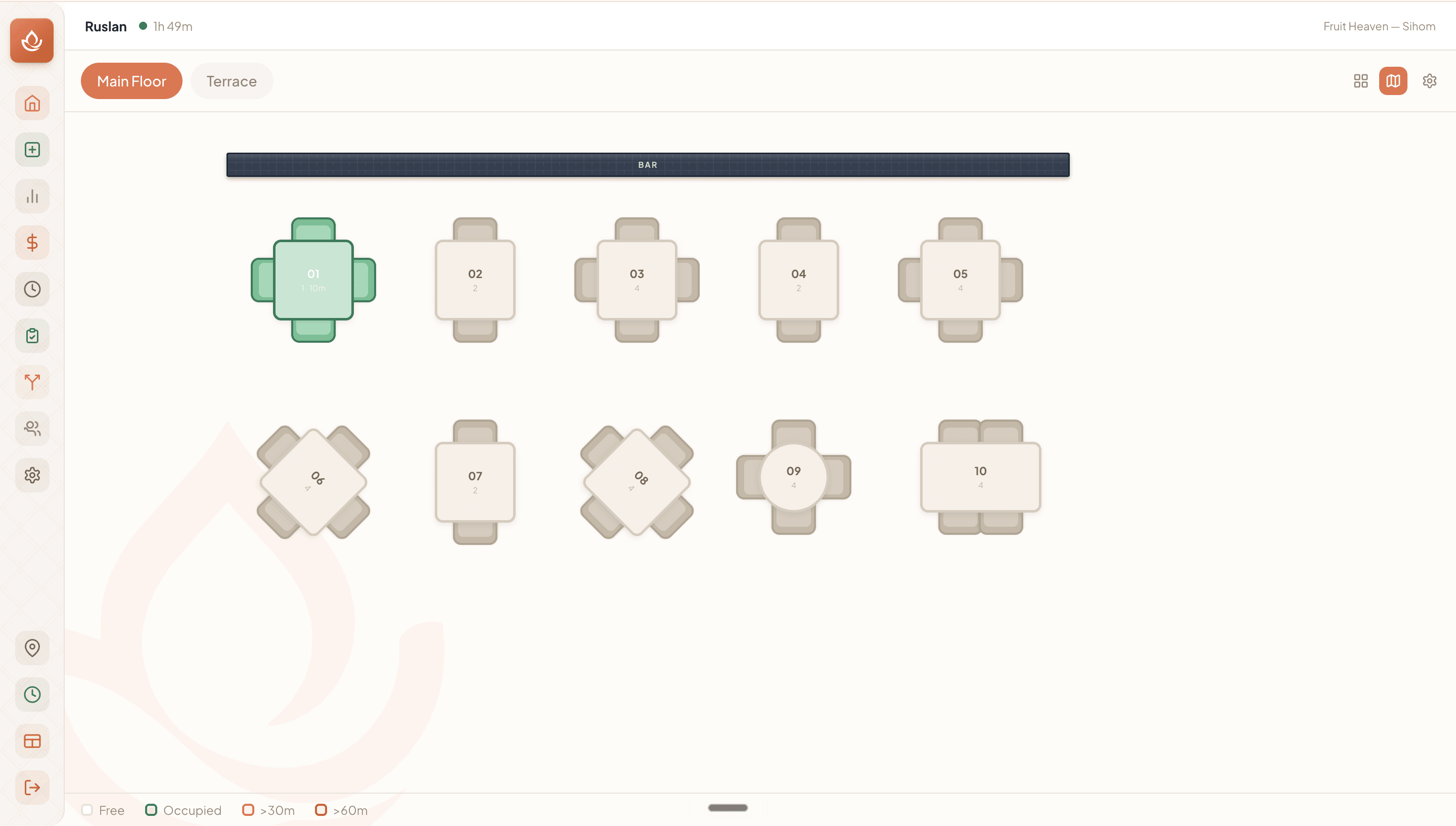
AvailableA visual floor plan with live table states lets your team see at a glance what's occupied, how long guests have been seated, and where service needs attention.
What it does
- Two view modes — Grid (card list) or Map (spatial canvas) — with your preference remembered.
- Tables are color-coded by status: free, occupied (<30 min), warning (>30 min), alert (>60 min); occupied cards show guest count and elapsed time.
- Multiple floor plans as tabs (Main Floor, Terrace, etc.); managers can add, rename, and delete areas.
- Floor-plan editor for managers: drag-drop tables and objects, set shape, size, capacity, and label; place structural elements (Wall, Bar, Entrance, WC, and more).
- Tap a free table to open the cover-count modal; tap an occupied table to jump straight to the open check.
Visual walkthrough
The POS floor plan (Map view)
FAQ
Yes — managers can switch to the floor-plan editor in Map view, drag tables to any position, and place structural objects like bars, walls, and entrances.
Related
Was this helpful?